PDF extraction became the bottleneck
A PDF is an annoying format for extraction, yet almost every document system has to deal with it.
FibrumPDF started while I was building Iris. PyMuPDF4LLM produced useful structured output, but parsing a large document collection was slow enough to become part of the retrieval pipeline’s cost. I wanted to know whether I could keep the useful parts while moving much faster.
I also wanted to know why everything was slow, and it came down to three things. Some tools are pure Python, which is a poor fit for nested loops and geometry, and a few had O(n²) algorithms hiding in the layout code. The ones that use OCR get the best quality and can read scans, but that’s slow, especially the open source ones. And almost none of them processed pages concurrently, so one core did all the work while the rest watched.
My first attempts were messy. I profiled Python, moved pieces into Cython, tried dropping into C, and eventually attempted far too much of the parser in pure C. It worked badly and the code was worse. At one point 900-odd lines lived in a single file. I’m not proud of it.
The version that made sense was simpler: use MuPDF for low-level PDF parsing, move the document processing into Go, and keep Python as the interface.
What it extracts
The point is not to dump text as quickly as possible. Tools such as pdftotext already do that well. FibrumPDF keeps the structure I need before a document enters search or RAG:
- headings and reading order;
- lists, emphasis and links;
- tables, including borderless tables; and
- page information that can be carried into citations.
The processing path looks like this:
PDF
 ↓
MuPDF
 ↓
text + positions + fonts + lines
 ↓
Go layout analysis
 ↓
structured document
 ↓
Python API
MuPDF reads each page once. Go then does the grouping, heading detection, geometry, tables and structure rebuilding. That split looks obvious now. It wasn’t, and getting there is where the speed came from.
Where the speed came from
There was no single trick. The git history reads like a long argument with a profiler, and these are the bits that mattered.
The cgo tax. My first Go version called MuPDF function by function through cgo. A page is thousands of characters, and every call across the boundary costs, so the whole thing came out about 3× slower. The fix felt backwards: write more C. One C function now walks the page and dumps everything (blocks, lines, characters, edges, links) into a compact binary file, and Go reads that in one go. JSON was too heavy for that handoff, with thousands of characters per page, so it’s a raw binary format.
One pass instead of two. MuPDF can give you styled text through a device. I also needed the page’s line edges for table detection, and I was getting them in a second pass. I wrote a custom device that calls the original and does my edge capture in the same loop. On a roughly 1,600 page Microsoft security document that alone was a 20% overall speedup. Later I switched off MuPDF’s style collection, which I wasn’t using at all: 211 to 244 pages per second, same quality scores.
Parallelism that survived contact with real PDFs. The first parallel version forked C worker processes. Handing each worker a fixed range of pages left some idle while others chewed through the heavy pages, so I switched to round robin (p += num_workers). Forking isn’t free either, so anything under max(10, 2 × workers) pages just runs sequentially. The fork workers also shared a font cache behind a process-shared mutex, so they didn’t all re-derive the same bold and italic flags.
When I moved the orchestration into Go, the rule changed. MuPDF’s entry point is process-global, so extraction is serialised behind a mutex, and everything after it (the layout and table work, which is most of the CPU) fans out across 3 × NumCPU goroutines. The font cache became process-local, a direct-mapped 256-entry table, because font pointers belong to a MuPDF context and can’t be shared safely.
Bounded memory, ordered output. Pages finish out of order, but the JSON has to be in order and I didn’t want a 1,600 page document sitting in RAM. So only a window of 2 × workers pages is ever in flight, finished pages wait in a small map until it’s their turn, buffers come from a sync.Pool, and the output goes to a temp file that’s renamed on success. A failed extraction never clobbers the previous result.
| Date | Change | Pages / sec |
|---|---|---|
| 17 Jul | First 512 document run | 162 |
| 17 Jul | Table pipeline cleanup | 211 |
| 17 Jul | Skip MuPDF style collection | 244 |
| 18 Jul | Capture table edges in the text pass | 318 |
The last jump is the one I like. It came from deleting work, not adding it. And the table detector got a stricter filter that rejects layout-shaped grids in the same stretch, which raised table precision to 0.661 without moving throughput.
Reconstructing structure that is not there
A PDF usually does not contain an <h1>. It contains text at a coordinate, with a font size and style. FibrumPDF combines those clues with punctuation, numbering and surrounding layout to infer headings and reading order.
Borderless tables were harder. To a person, evenly spaced rows and columns obviously look like a table. To a parser, they are only text fragments at coordinates. FibrumPDF looks for repeated horizontal gaps across several rows and treats them as possible column boundaries.
Concretely, it clusters every character’s vertical centre into rows with a 1-D clustering pass, sorts each row left to right, and looks for gaps that line up from row to row. None of the tolerances are fixed numbers. They scale with the page’s average character width and how densely it’s packed with text, because a 9 point financial table and a 14 point slide need very different notions of “a gap”. Pages with fewer than 50 characters are skipped, and so are dense text pages with almost no drawn lines, since that’s mostly just prose.
That also made two-column research papers look like giant tables. I added checks for wrapped prose, newspaper-style columns, sparse grids and layouts covering most of the page. The detector is not only asking whether something looks like a table. It is also looking for evidence that it definitely is not one.
I liked this part of the project. It is geometry, whitespace and statistics trying not to get tricked, without a model looking at a screenshot.
Benchmarked on real PDFs
I benchmarked FibrumPDF against PyMuPDF4LLM and Docling across 512 PDFs using a version of Marker’s benchmark fitted to this project.
| Parser | Pages / sec | Text score | Table TEDS |
|---|---|---|---|
| FibrumPDF | 318.23 | 87.31 | 0.783 |
| PyMuPDF4LLM | 4.15 | 86.54 | 0.778 |
| Docling | 0.62 | 91.13 | 0.821 |
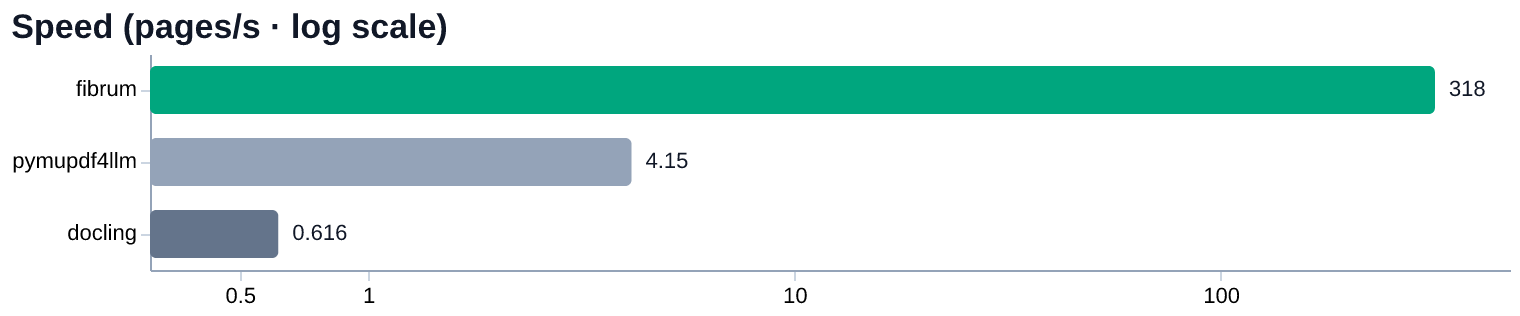
Extraction throughput compared with PyMuPDF4LLM and Docling.
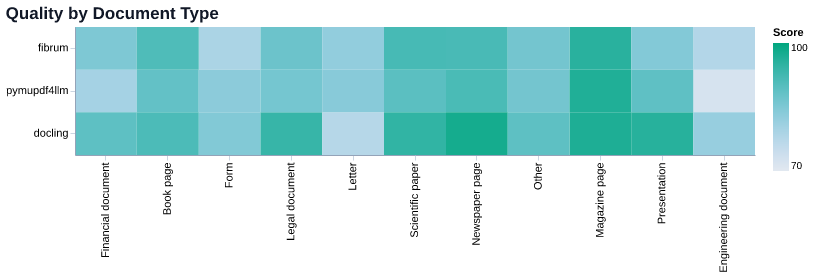
Text and table quality on the same benchmark.
The surprising part was not only the speed. FibrumPDF ended up around 77 times faster than PyMuPDF4LLM on this benchmark while producing almost identical measured text and table quality.
Docling still scores better on harder documents, which makes sense because it performs more expensive document understanding. FibrumPDF occupies the middle I wanted: useful structure for retrieval, without waiting seconds for every PDF.
The boundary is part of the optimisation
Extract text, positions, font metadata and vector edges once. PDF interpretation stays in the library built for it.
Split blocks, classify text, infer layout, reconstruct tables, then post-process. Geometry and native concurrency replace Python hot loops.
Expose structured output and iterate pages with ijson. collect() is the explicit point where the result becomes an in-memory collection.
The Go extractor has a deliberate sequence: parse raw data, split blocks, classify, infer layout, extract tables, and post-process. Rather than crossing into Python for thousands of tiny operations, the geometry-heavy work stays together.
Because the output is structured, not just text, it also does things I didn’t plan for. Semantic chunking is the obvious one: you can split on headings and keep tables whole instead of cutting every N characters. The Python API also makes materialisation a choice. Iteration uses ijson to stream pages from the generated JSON; collect() pulls them into memory. Markdown output is written to a temporary file beside its destination and replaced on completion.
AN UNGLAMOROUS COMPATIBILITY COST
Older native libraries report errors through stdout and stderr. The compatibility path captures those streams under a lock. Supporting older binaries comes with a serialised corner of an otherwise concurrent system.
Fast is not the same as universal
My benchmark run used 512 deterministic samples from Marker’s benchmark, seed 0, and one run on a Ryzen 7 4800H. Docling had access to a GTX 1650 Ti. You can reproduce them from the repo, but they’re not a guarantee for every machine or document.
There is no OCR or embedded-image extraction. Scanned pages and difficult forms are outside the sweet spot. Docling leads on harder documents; the useful trade is throughput for retrieval-ready structure, not winning every quality metric.
The table detector first tries ruled tables, then falls back to borderless detection when output appears over-segmented. One code-level signal: short, letter-heavy cells accounting for at least 22% of non-empty cells. A rule like that is useful precisely because it admits the first guess can be wrong.
SOURCE TRAIL / Benchmark & limitations ↗︎
Table fallback pipeline ↗︎ · Streaming Python API ↗︎