The terminal was the constraint
I had wanted to make a game for a while, and I wanted an excuse to properly learn Rust and Bevy. Terminals are also cool, so I started Termdash for Hack Club Horizons: a Geometry Dash-style game rendered inside one.
It began as a rendering experiment. Then I added physics, obstacles, triggers, portals, sprites, music, reusable prefabs, JSON levels, live testing and a separate graphical editor. At some point it became a fairly normal game engine wearing a terminal as a disguise.
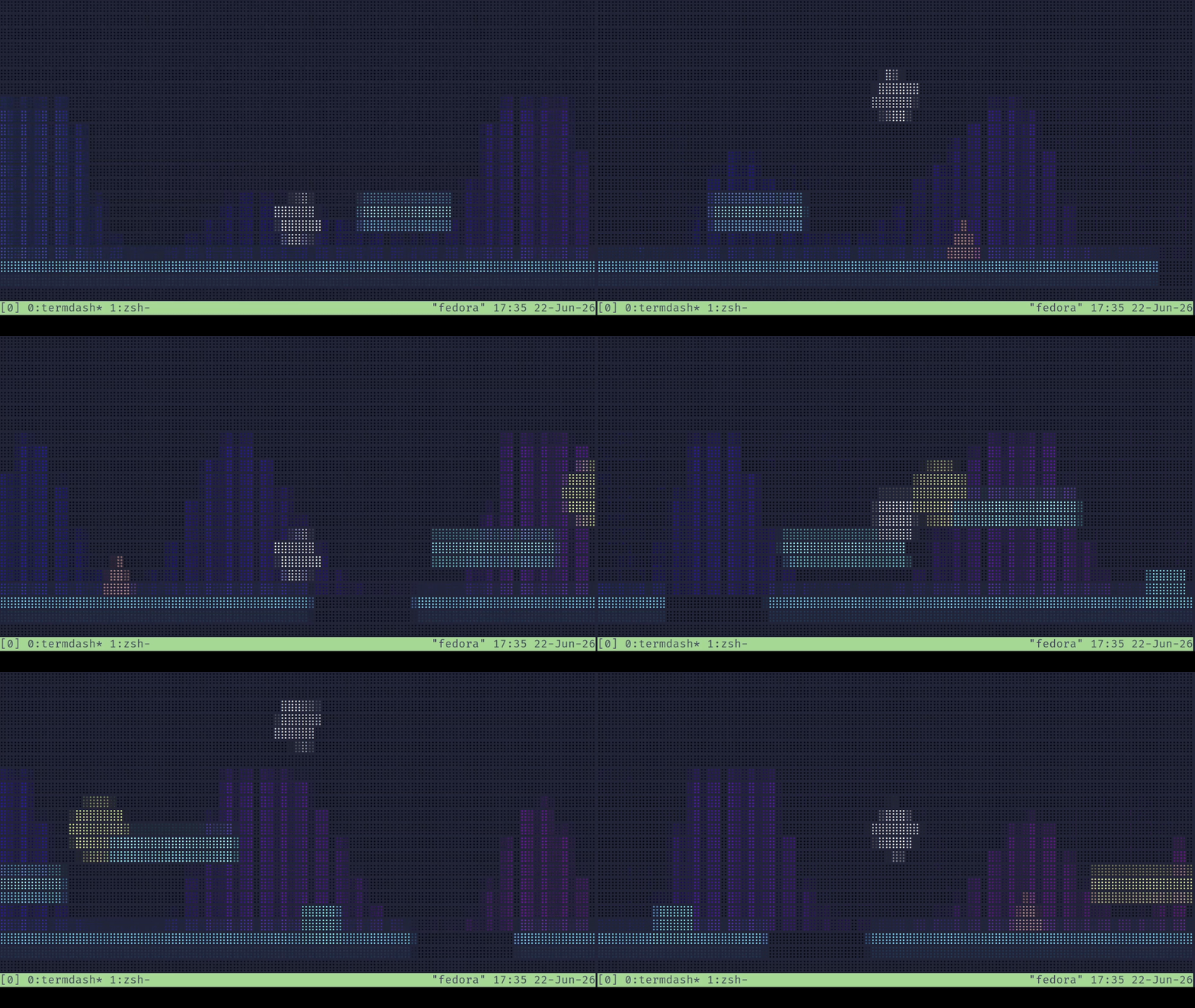
Bevy gameplay rendered as coloured Unicode Braille.
Turning a game into text
A terminal cell does not give you much resolution. Unicode Braille helps because each character contains a 2 by 4 grid of dots, so one cell can represent eight image samples.
Termdash lets Bevy render the game normally, then converts the resulting image into Braille:
Bevy world
    ↓
rendered image
    ↓
2 by 4 pixel blocks
    ↓
Braille dots + colour
    ↓
terminal cells
The camera renders at exactly columns × 2 by rows × 4 pixels, so every image pixel is one Braille dot and one terminal cell is one 2 by 4 block of them. For each block, the renderer builds an 8-bit mask, because Braille starts at U+2800 and each dot is a bit. The bit order isn’t row by row either. The bottom two dots were added to Braille later than the first six, so they sit out of order at 0x40 and 0x80, which tripped me up for a while.
Straight conversion worked, but thin spikes and lines vanished whenever they fell between samples, and a spike that disappears is a bad thing to lose in a game about spikes. So there are three small cheats:
- A pixel counts as lit if it’s opaque and either bright (
r + g + b > 90) or colourful (chroma above 35). Dull background pixels stay dark. - Lighting a dot also lights its neighbours above, below and beside it, so a one pixel line becomes a thick one.
- The cell’s colour is the average of only its lit samples, pushed through a contrast curve,
((v - 0.5) × 1.45 + 0.5) × 1.25, before it goes to the terminal as RGB.
None of it is clever. Each one is a rule that fixed something I could see on screen, and together they’re the difference between playable and Unicode soup.
The game itself does not know that it will become Braille. Bevy handles entities, transforms and rendering, while Avian2D handles physics. The terminal conversion sits at the end of the pipeline. That separation meant I could build normal game systems without writing an entire engine around terminal cells.
Movement without a physics body
Avian2D handles collision, but I didn’t let it drive the player. A rigid body bounces, slides and gets nudged by things, and a Geometry Dash cube does none of that. So the player is kinematic: each frame I move it along an axis and shape-cast the collider in that direction, up to eight hits, and stop 0.05 units short of the first solid thing in the way.
The detail that matters is the filter. A hit only counts as blocking if its surface normal roughly opposes the direction of travel (a dot product of at least 0.5). Without it, grazing the top of a block as you run over it registers as hitting a wall, and you die for touching a floor. Landing on something and running into something are different events, and they come down to one dot product.
Two timers make it feel fair. There’s a 0.1 second grace after leaving the ground in which a jump still works, and a 0.1 second buffer so pressing jump slightly before landing still works. Strict physics would say no to both. I added them because the game felt better with them. My commit message for the buffer says as much: strict physics aren’t needed here. Gravity is a direction on the player rather than a constant, so flipping it is one field and the rest of the movement code doesn’t know or care.
A bug I liked: you could pause at the right moment during the death animation and walk through the object that killed you. Pausing also bumped the attempt counter again. The fix was a dedicated DeathPause state, so that menu can’t do anything else.
Building levels without editing JSON forever
Hand-writing level files got old quickly. Levels use reusable prefabs, so an object can inherit its visual, collider and behaviour while only overriding values such as position or scale.
Triggers work the same way. Rather than a hardcoded “gravity portal” and “speed pad” and so on, a trigger holds a list of composable effects: flip gravity, multiply the scroll speed, set the player’s scale, kill the player, or a sequence of those. Which means a new kind of obstacle is usually a few lines of JSON, not new Rust.
Level data goes through a small procedural macro, #[level_data]. Stick it on a struct and it derives the serialisation and Bevy reflection traits, marks every Option field to be skipped in the file when it’s None, and registers the type with the app through the inventory crate, so adding a new object type doesn’t mean remembering to touch a registry. An authored object is parsed as a partial, merged over its prefab’s defaults, and only then turned into a fully required runtime object. A level’s width isn’t stored at all. It’s wherever the last ground segment ends.
That led to a separate egui editor. It can place and edit objects, save the level, launch the real game for testing, and undo or redo completed edits using bounded level snapshots.
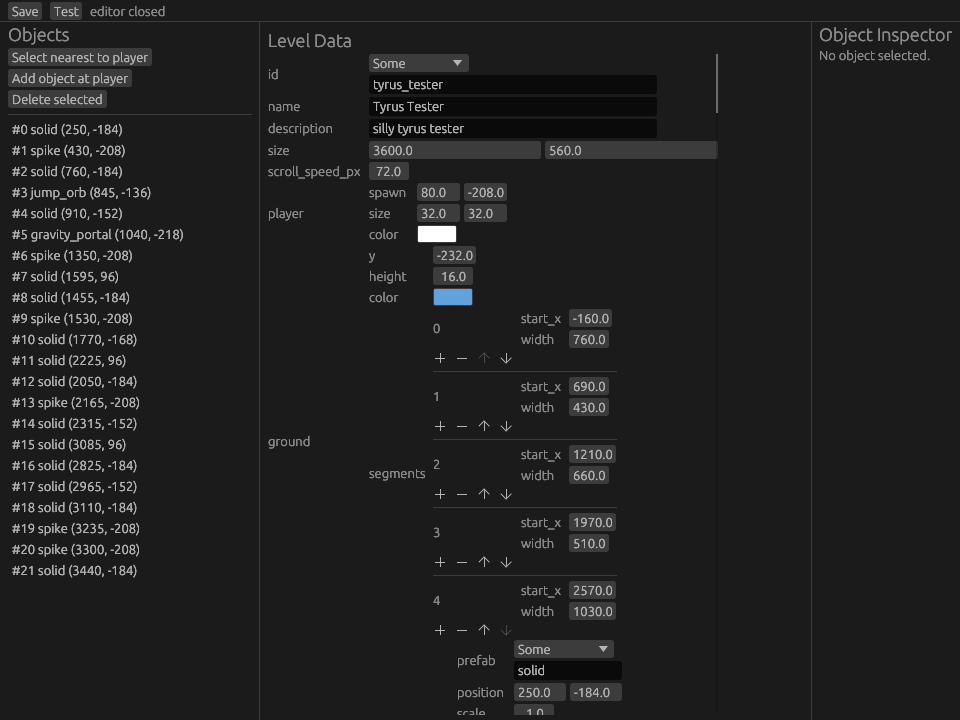
The graphical editor and terminal game use the same level data.
Many level types needed the same Serde and Bevy reflection setup, so I wrote a small Rust attribute macro to add the repeated derives, handle optional fields and register each type with the app. It is more infrastructure than a square jumping over spikes should need, but learning those parts of Rust was part of the reason for making the project.
From rendering experiment to complete game
Termdash gave me one project where I had to connect Bevy’s ECS, physics, terminal rendering, proc macros, reflection, serialization, editor state and release builds.
It also contains an audio visualiser that looks like it reacts to the music but does not. The game needed bars moving in the background, so they move. That joke stayed because I’ve always owned up to it in the README.
The unusual output was useful rather than decorative. It forced the renderer, gameplay and editor to stay separate, and turned a small terminal experiment into a complete playable system.
Eight dots, not eight characters
2 × 4 → 1 cell
A Braille cell packs eight on/off samples into one Unicode code point. The dots are not ordered row-by-row in Unicode, so the mapping matters. The little cell above exposes that boundary between pixels and text.
A level is the unit of undo
The editor stores cloned Level snapshots instead of a command for every kind of edit. New edits truncate the redo branch; the stack is capped at 100 snapshots. Before undo or redo, a pending edit is finished, selection is clamped, and the level is refreshed.
It is a deliberately simple solution with a visible memory bound. It also means every new object type can participate in undo without inventing another inverse operation.
The content schema keeps behaviours and visuals separate: Solid and Trigger behaviours; shapes and sprites for appearance; optional fields that merge into named prefabs. The graphical editor and terminal game share the same data.
SHIPPED TARGETS ≠ TESTED TARGETS
Release builds cover Linux, macOS and Windows. I’ve only tested it on Linux. The two built-in levels are basic, and the audio visualiser is proudly fake.
SOURCE TRAIL / Undo & pending edits ↗︎ · Level schema ↗︎
Rendering dependencies & caveats ↗︎